A condition rating from 1 to 5
Assign a condition rating to each item to maintain a simple and consistent reference over time.
Create move-in and move-out property inspections from the property inventory or from a previous inspection. Document each item, collaborate with the tenant and keep a clear history through to the final document.
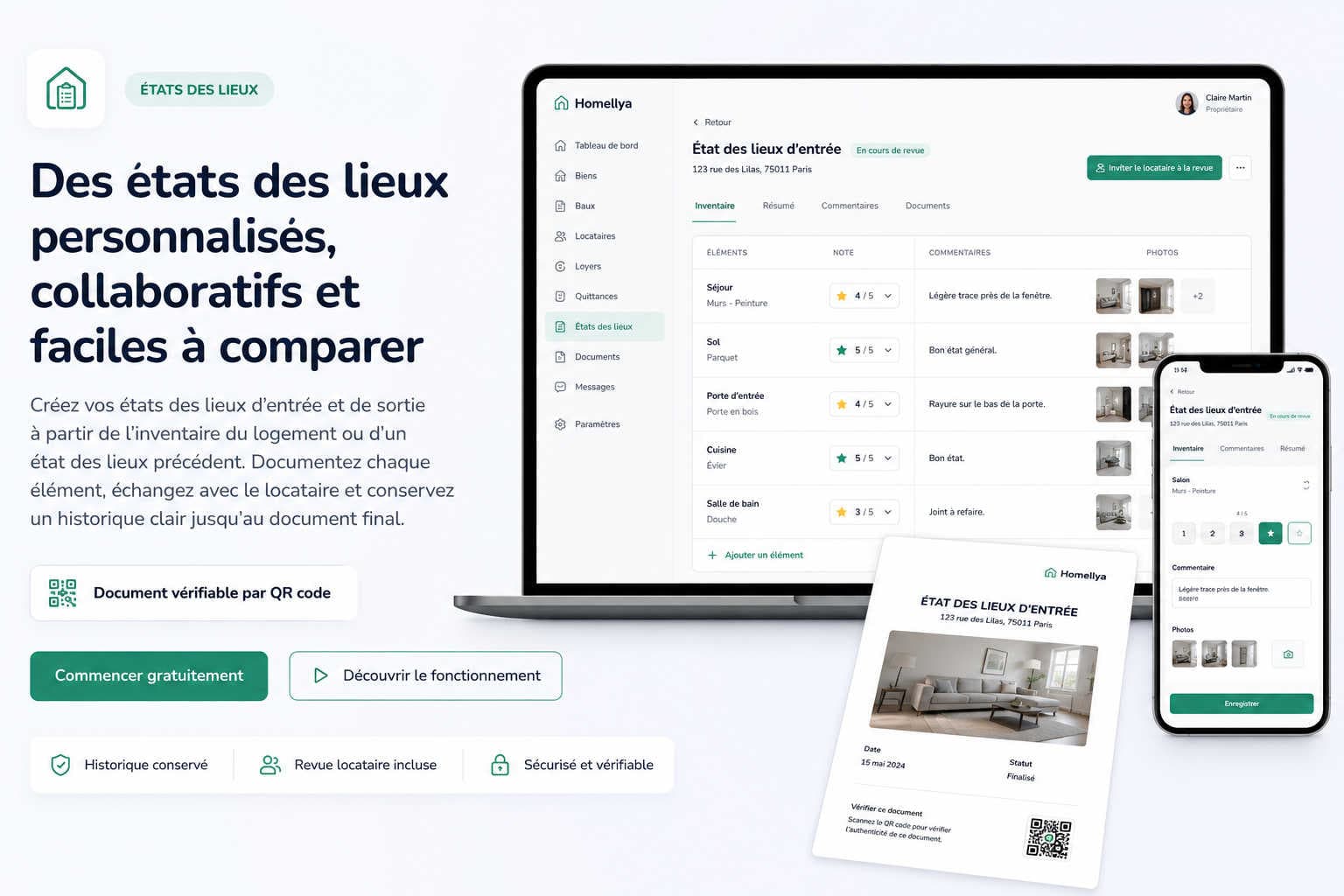
Homellya keeps the structure and history of your property so that you can create a new inspection from the most relevant starting point.
You can start:
Existing information can therefore be reused and adjusted instead of being entered again from scratch.
You do not have to systematically reuse the original move-in inspection.
In a shared rental, for example, you can start from the latest available inspection so that the common areas reflect a more recent condition when one occupant changes.
Every property is different. Homellya therefore lets you build an inventory that reflects the actual rented property and the items you want to track.
You can include rooms, floor and wall finishes, doors and windows, bathroom fixtures, kitchen equipment, appliances, furniture in a furnished rental, ancillary areas, or any other item useful for monitoring the property.
Assign a condition rating to each item to maintain a simple and consistent reference over time.
Add an observation to describe a mark, defect or any item that requires additional context.
Attach photos directly to the relevant items to complement the visual record.
When a new inspection is created from an existing one, Homellya carries over the information already recorded so that you can update it.
This includes in particular:
You can then change only what has actually evolved.
This continuity makes it easier to prepare move-out inspections and understand how the property has changed between two inspections.
A property inspection does not have to be limited to a document prepared by the landlord and then presented directly for signature.
Homellya allows the inspection to be sent to the tenant so that they can carry out their own review.
The tenant can in particular:
The tenant's observations remain stored and can be reviewed by both the landlord and the tenant.
Even when the parties do not immediately share the same assessment of an item, the observations made during the review are not lost. They remain accessible in Homellya so that the context of the discussion is preserved.
The landlord remains responsible for the final validation of the property inspection before it is sent for signature.
Start from the property inventory or from a previous move-in or move-out inspection.
Adjust the ratings, comments and photographs so that they reflect the condition observed.
The tenant can add their own observations, ratings and photos and indicate the points they agree or disagree with.
The landlord reviews the observations and remains responsible for the final version sent for signature.
Homellya generates the final document, which can then be electronically signed within the platform.
Once the property inspection has been finalized, the landlord and tenant can sign it electronically directly in Homellya when this feature is used.
If the inspection was signed outside the platform, the landlord can also upload their own signed document so that it remains stored in the property's file.
Have the final document signed directly by the parties within Homellya.
Keep a document signed through an external process in Homellya as well.
Property inspection documents generated by Homellya include a verification QR code.
Property inspection
The QR code opens a public Homellya page where the recipient can verify that the document corresponds to a document recorded and produced within the platform and view its status.
The document can therefore be checked without having to contact the landlord or tenant directly.
The QR code provides a way to verify the document's origin within Homellya. It does not replace the contents of the document or the signatures of the parties.
Property inspections are not isolated from the rest of the tenancy file.
They remain linked to the property, the lease and the people concerned so that continuity is maintained over time.
By keeping the inventory, condition ratings, observations and photographs, Homellya allows you to continue monitoring the property during the next inspection without losing the context of previous records.
This approach is particularly useful when several inspections follow one another, especially in shared rentals or when occupants change at different times.
Homellya brings together properties, leases and tenants, payments and receipts, documents and signatures, inspections, requests and budgets. Access to features and capacity depends on your chosen plan.
Yes, you can store and organize documents linked to each property and rental.
Yes. Homellya lets you create both move-in and move-out property inspections. You can start from the property inventory or a previous inspection, reuse the items already recorded and update them.
Yes. The landlord can build an inventory tailored to the rental property and add the items they want to track: rooms, finishes, equipment, furniture, appliances, ancillary areas or any other useful item. Each item can then be assessed with a rating from 1 to 5, a comment and photographs.
Yes. A new property inspection can be created from a previous move-in or move-out inspection. This lets you start from the most relevant record instead of entering all the information again.
Yes. The landlord can send the property inspection to the tenant for review before final approval. The tenant can review the recorded items, add their own comments and take part in reviewing the inspection.
The tenant can indicate that they disagree with certain items and add their own ratings, comments or photographs. This review is stored in Homellya and remains available to both the tenant and the landlord. The landlord then remains responsible for final approval of the document before it is sent for signature.
The landlord is responsible for final approval of the property inspection. They can review the tenant’s feedback, take the comments into account and adjust the inspection before finalizing the document and sending it for signature.
Yes. Once the property inspection has been finalized, the landlord and tenant can sign it electronically directly in Homellya when this feature is used.
Yes. If the property inspection was signed outside Homellya, the landlord can upload their own signed document to keep it with the property file.
Property inspections generated by Homellya include a verification QR code. It opens a public Homellya page where you can verify that the document matches a document recorded and produced within the platform and view its status.
Homellya lets you create a new property inspection from the latest relevant record, whether it is a move-in or move-out inspection. For shared rentals, this means you can start from a more recent record of the common areas when an occupant changes, instead of systematically using an inspection that has become outdated.
Prepare an inventory tailored to the property, reuse previous inspections, involve the tenant in the review and keep the property's history through to the final document.
No credit card required · Data hosted in France