Owner / manager
Track rent, record payments and obtain receipts
Distinguish amounts due, recorded payments and available rent receipts.
Where to go : Lease → Rent and receipts
Before you start
Check the period, rent, charges and payments actually received.
Available actions depend on your role, plan and the record’s current state. This manual explains how to use the product; legal topics are covered in the resource centre.
Step by step
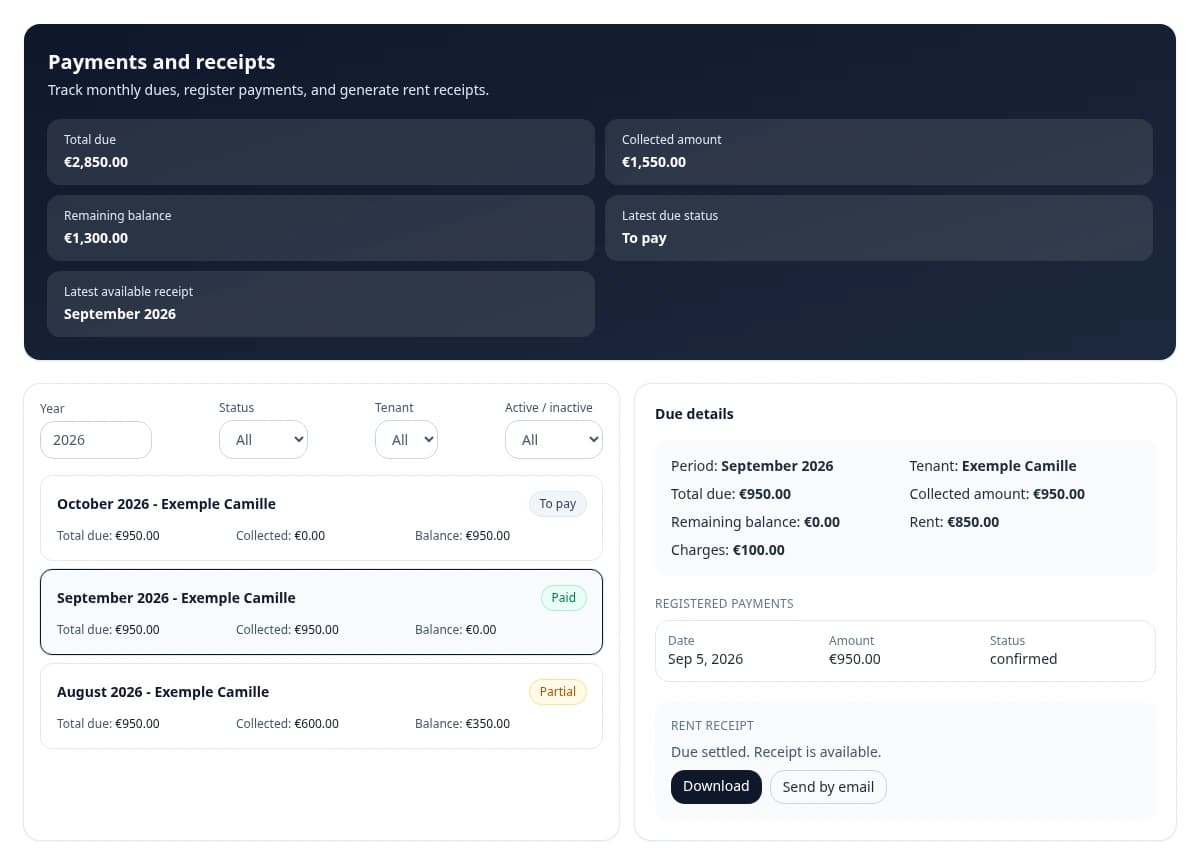
Open the lease, then rent and receipts. Select the period and check existing dues.
Use monthly generation or manual creation for missing dues where offered. Check that a line does not already exist before adding one.
Record the actual payment amount and date. Recording a payment in Homellya tracks money received: it does not collect a bank payment.
After saving, check the paid amount and remaining balance. A partial payment does not justify a full-payment rent receipt.
When the due is fully paid and the action is available, generate or download its receipt. Check the contents before sharing.
After a connection loss while recording payment, refresh the list to verify the operation before entering it again.
Check the result
The follow-up reflects recorded payments and lets you find eligible rent receipts.
If something goes wrong
Missing a receipt? Check the balance, period and generation status. Tenants only see documents actually available in their space.